Short answer
Popular Robots.txt SEO advice says to block every low-value path and every AI bot, then forget the file. That advice gets the job backwards, because aggressive blocking can hide pricing pages, break rendering, and cut off AI search retrieval while still failing to remove URLs from Google.
On this page
What Robots.txt Controls for Your Site#
Robots.txt is a plain-text file at the root of a domain, such as yoursite.com/robots.txt, that tells crawlers which URLs they may request. It controls crawl access, not rankings or removal from search, so it belongs in technical SEO as a crawl-management tool.
Martijn Koster proposed the convention in July 1994, it stayed an informal webmaster standard for nearly three decades, and the IETF published RFC 9309 in September 2022, as Google's robots.txt specification documents. Google retrieves and parses the file before crawling a site.
Say a project management SaaS runs logged-in dashboards under /app/, internal search at /search?q=, and public pricing and integration pages. The first two waste crawler requests and suit a Disallow rule, while pricing and integrations must stay crawlable.
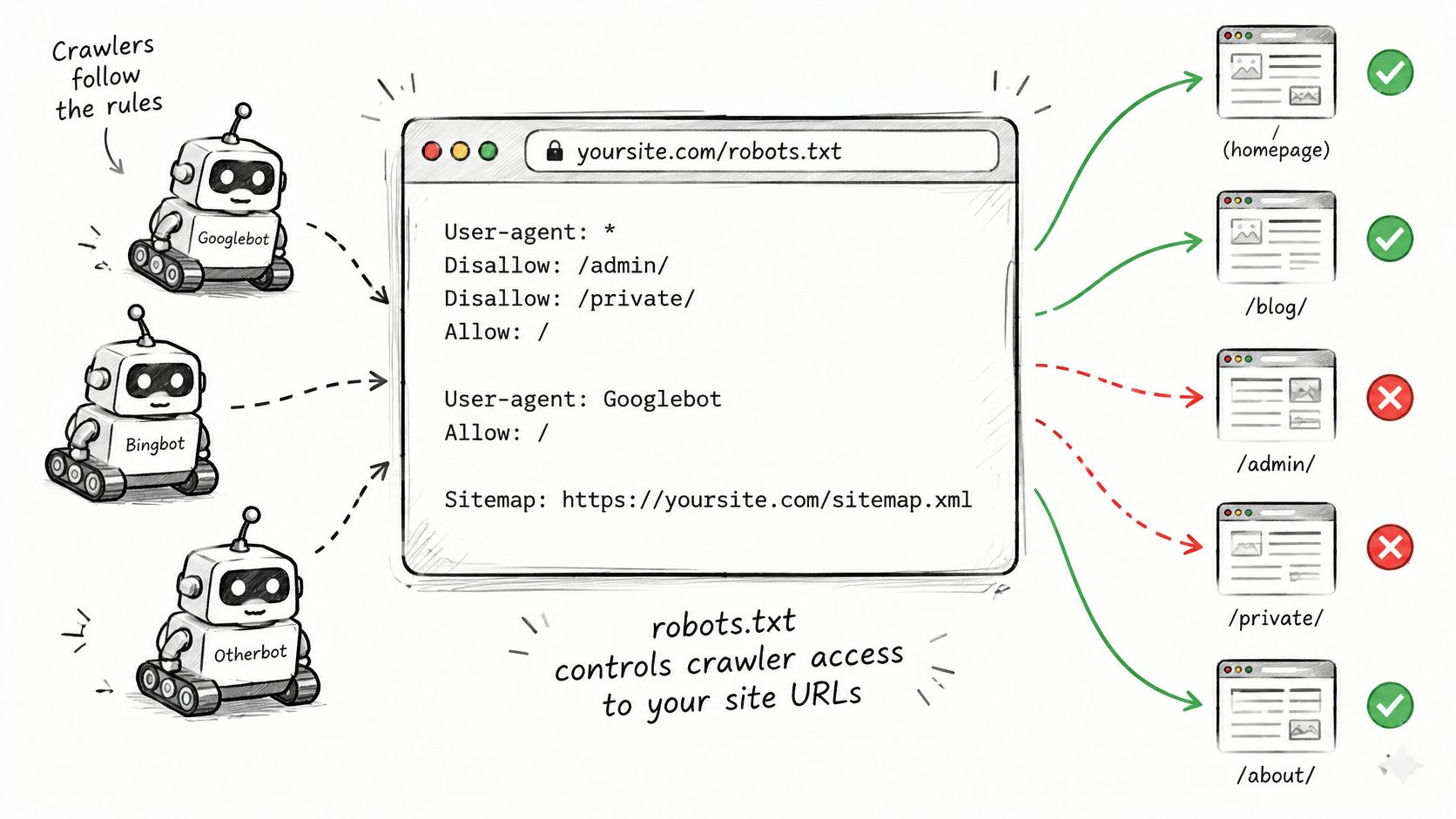
Crawlers make a limited number of requests per site. Blocking duplicate parameters and staging areas helps them reach feature pages sooner. Today's check is simple. Open the live file and look for any Disallow line that blocks a page the business wants found.
Robots.txt Directives at a Glance#
| Directive | What it does | Example | Google support |
|---|---|---|---|
| User-agent | Names the crawler a group applies to | User-agent: Googlebot | Supported |
| Disallow | Blocks crawling of a path prefix | Disallow: /app/ | Supported |
| Allow | Re-opens a path inside a broader Disallow | Allow: /app/help/ | Supported |
| Sitemap | Gives the full URL of an XML sitemap | Sitemap: https://yoursite.com/sitemap.xml | Supported |
| Wildcards ( and $)* | Match any characters, or match the end of a URL | Disallow: /*?sort= | Supported by Google |
| Crawl-delay | Asks a crawler to wait between requests | Crawl-delay: 10 | Not supported, ignored by Google |
Three rules cause most confusion. First, when Allow and Disallow overlap, the most specific matching rule wins, so a long Allow can reopen one help page inside a blocked app folder. Second, an empty Disallow: line allows everything.
Third, each User-agent line starts a new group. A named group for Googlebot overrides the ***** group for that crawler, so rules left only in the catch-all group won't apply to it.
Wildcards and Sitemap Lines#
Google honors /?sort=*** to block sorted filter URLs, and /*.pdf$ matches only URLs ending in .pdf. The Sitemap line takes a full absolute URL and can sit anywhere in the file.
Practical rule: Keep the file short, list only paths that waste crawling, and add a Sitemap line so crawlers find the URLs that matter.
How to Write and Test a Robots.txt File#
Treat robots.txt as a policy to test against real URLs, not a file to publish and forget. Work through the changes before they reach the live site:
- Open the live file: Load
yoursite.com/robots.txt. Confirm it returns plain text with a 200 status. A redirect to a login page can affect crawler access. - List paths to review: Include logged-in app areas, internal search results, filtered and sorted listings, and staging hosts. Use sitemap URLs and server logs to find examples.
- Set crawler groups: Start with **User-agent: *** for rules shared by crawlers. Add a named group only when a crawler needs different rules.
- Write precise paths: Use one Disallow line per path prefix, with a trailing slash for folders such as /app/. Include the absolute Sitemap URL.
- Save in the expected format: Serve UTF-8 plain text at the origin's top-level path and keep the file under Google's 500 KiB file-size limit, as specified in RFC 9309 and Google's implementation rules.
- Test before publishing: Check important URLs against the proposed rules, including a parameterized URL. Verify that broad rules do not block pages you intend crawlers to access.
- Publish and verify: After publishing, test the live file and the same URLs again. For an urgent Google access change, request a recrawl in Search Console.
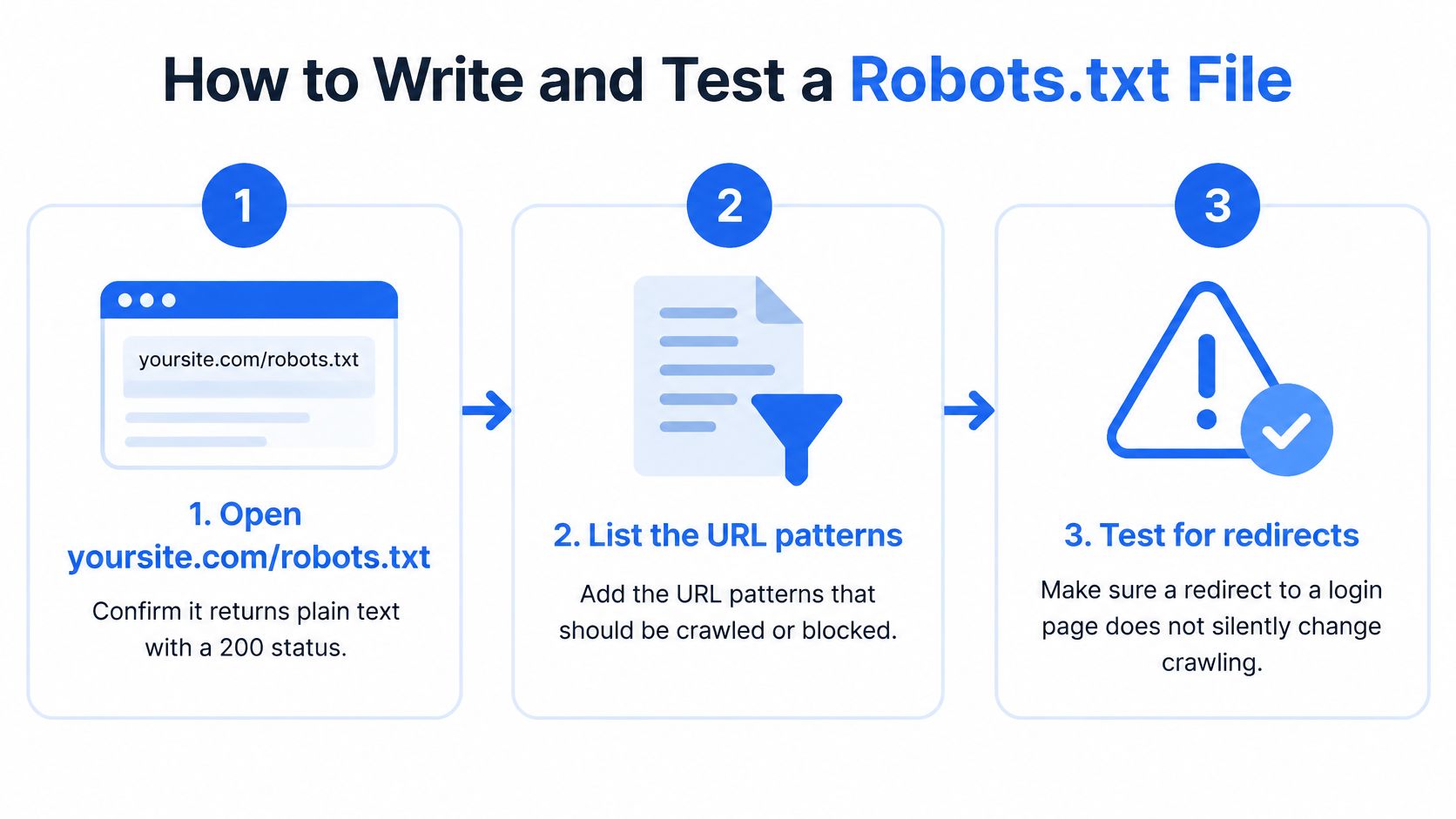
Check both content pages and the resources needed to render them. Pricing, feature, and blog URLs, along with sitemap, JavaScript, CSS, and image resources, should test as allowed when crawlers need access. Only paths you deliberately intend to restrict should test as blocked.
Common Robots.txt Mistakes That Hide Good Pages#
The costliest mistake is a Disallow: / line that ships from staging to production with a launch. Pages drop out of crawl activity over days, and nobody notices until traffic falls. Step 6 of the testing procedure catches that staging check before release.
Other errors are quieter but still expensive:
- Blocking /css/ and /js/: Google can't render templates the way visitors see them. Test one stylesheet and one script URL from a pricing page against the rules.
- Blocking a noindex page: Google never fetches the page, so it can't read the noindex tag. Test every URL that carries noindex and confirm it stays crawlable.
- Case mismatches: Paths are case-sensitive, so /Pricing/ doesn't block /pricing. Test the exact casing used in production links.
- Wildcard typos: A rule like *Disallow: /pricing can catch comparison and discount pages that should rank. Test three URLs containing that string.
- Sitemap conflicts: A sitemap listing blocked URLs sends mixed signals. Cross-check sitemap entries against the file and remove blocked URLs.
These errors rarely trigger alerts. Search Console may report blocked resources, but it won't confirm that every revenue page is crawlable.
The only reliable check is testing the exact URLs the business cares about, on every release, not reading the file and assuming it's fine.
Where Robots.txt Stops Working#
Robots.txt doesn't remove a page from search. That's the assumption worth dropping first.
Google's introduction to robots.txt states that a URL disallowed in robots.txt can still be discovered and indexed when other sites link to it, and the URL and potentially publicly available information such as anchor text may appear in search results even though Google cannot crawl the page. Blocking prevents fetching, not discovery.
Use the Right Tool for Each Goal#
For pages that must stay out of results, leave them crawlable and add a noindex meta tag or X-Robots-Tag header, because Google can't read those rules on a blocked URL. For duplicate URLs, use canonical tags to name the preferred version. Teams can review how these crawlability controls fit together in Kliqo's crawlability documentation.
Compliance is also voluntary. Crawlers choose whether to obey, so the file doesn't protect data and doesn't control what a crawler does with content after retrieval. Confidential documentation, customer portals, and staging environments need authentication, not a Disallow line.
The three-part rule is straightforward. Use robots.txt to save crawl resources, noindex to keep pages out of results, and authentication to protect private data.
Choosing AI Crawler Rules Without Losing AI Search#
Most guides treat all AI bots as one category. They're not, and Search Engine Land's guide to optimizing for AI crawlers notes that AI crawlers can be targeted with separate user-agent rules, with distinct training, search and user-triggered classes.
| Crawler | Purpose | What blocking it changes |
|---|---|---|
| GPTBot | Training | Stops content being collected for OpenAI model training |
| OAI-SearchBot | Search | Stops retrieval of pages for ChatGPT search results |
| ChatGPT-User | User-triggered | Stops fetches made when a ChatGPT user asks for a page |
| ClaudeBot | Training | Stops content being collected for Anthropic model training |
| Claude-SearchBot | Search | Stops retrieval of pages for Claude search answers |
| PerplexityBot | Search | Stops retrieval of pages for Perplexity answers |
A brand that wants AI search visibility without training typically blocks GPTBot and ClaudeBot while allowing the search bots on public pages. Blocking GPTBot doesn't automatically remove a site from ChatGPT search, since training and retrieval are separate pathways. A publisher that wants both allows all six, while a SaaS company protecting gated documentation should rely on authentication anyway.
Allowing a search bot isn't proof of visibility. The file only permits the request, and the AI system still decides whether to cite the page, a distinction covered in Kliqo's guide to getting recommended by ChatGPT. Verification matters too, because user-agent strings can be spoofed, so teams should check server logs and confirm identity by IP or reverse DNS where a crawler publishes guidance.
Measurement closes the loop. Ask each assistant the questions buyers ask, record which pages get cited, and compare results with server logs. Kliqo tracks ChatGPT, Google AI Overviews, Google AI Mode, Gemini and Copilot, so those prompts can run on a schedule instead of by hand.
Monitor Robots.txt After Every Release#
A robots.txt file can look valid while allowing only broad catch-all rules, or it can go live without its rules being tested against important URLs. Check it after each release and monthly, especially after changes to hosting, routing or the CDN.
| Response | How Google treats it | What to do |
|---|---|---|
| Valid file with rules | Crawl rules are applied | Confirm rules match intent |
| Empty file | No crawl restrictions | Add rules only when needed |
| 404, no file | Treated as successful with no rules | Fine for sites needing no restrictions |
| 429 or 5xx, persistent | Can reduce or pause crawling | Fix server capacity or the response |
| Failed fetch, first 12 hours | Crawling may stop briefly | Restore the file quickly |
| Failed fetch, 12 hours to 30 days | Last successful file is used | Fix the cause, then request a recrawl |
| Failed fetch past 30 days, homepage reachable | Treated as no crawl restrictions | Restore the file immediately |
Use a release routine that catches both file changes and their effects:
- Version control: Keep the file in the repository so changes can be reviewed and traced to a release.
- Alerting: Flag statuses other than 200 or 404, unexpected redirects, content-type changes and file-size changes.
- Log checks: Compare search and AI crawler visits with the pages those crawlers were expected to read.
- Deploy tests: Check key URLs against the rules after each deploy and hosting or CDN change.
A status check alone does not confirm that the right pages remain accessible. The free AI crawler access check checks robots.txt health, the sitemap and whether the homepage is readable without JavaScript, then gives the exact fix. Every Kliqo plan also includes a robots.txt audit across AI bots and URL access tests.
Keep the file short, assign an owner, and review it after each launch. A rule that made sense before a route or product change can block a page you intend crawlers to read.
FAQ#
Does robots.txt help a page rank higher#
No, not directly. It controls crawl access, so the benefit is indirect. Crawlers spend their requests on crawlable, canonical pages instead of filtered duplicates, which gives important URLs a better chance of being refreshed.
Does a site need a robots.txt file at all#
No. A small SaaS marketing site with no private paths can run without one. A file becomes necessary once there are app areas, internal search results, or parameter patterns worth blocking.
Should GPTBot be blocked to stay out of ChatGPT search#
Not necessarily. GPTBot collects training content, while OAI-SearchBot retrieves pages for search answers, so blocking one doesn't block the other. Teams that want search visibility without training block only the training crawler.
How can a team check whether AI assistants cite its pages#
Track the buying prompts that matter across assistants on a regular schedule. Record which pages each answer cites, then compare those citations with server logs to confirm the crawler could fetch the cited pages.
Allowing the right crawlers is only half the work, since a crawlable page still has to be cited and recommended in real AI answers. Kliqo AI tracks buyer prompts across ChatGPT, Google AI Overviews, Google AI Mode, Gemini and Copilot, records which pages get cited, and includes robots.txt audits in every plan.